Spndy AIPlain-language answers about your own numbers

Every dollar, accounted for.

Record your accounts, income and spending, give each category a monthly budget, and check one number every day: Safe to spend. Spndy runs in your browser and does not ask for your bank login.

  • Free plan available
  • Email or Google sign-in
  • Works on phones and computers
  • No bank connection
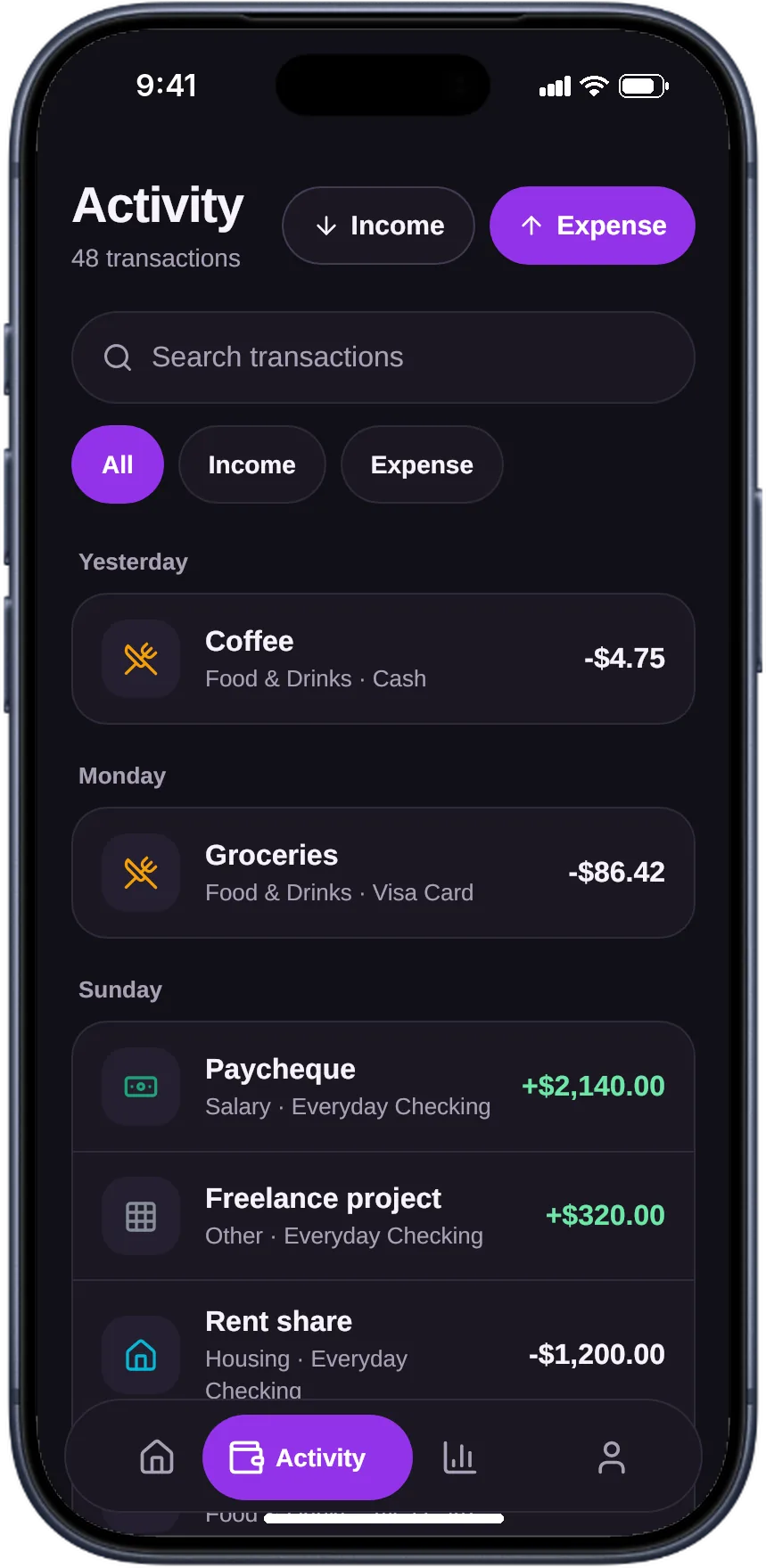
The Spndy Activity screen with fictional transactions grouped by day, a search box and Income and Expense filters.
The Spndy Home screen for the fictional customer Jordan Lee, with a Safe to spend today estimate, the days left in the period, and buttons to add income, an expense or an account.
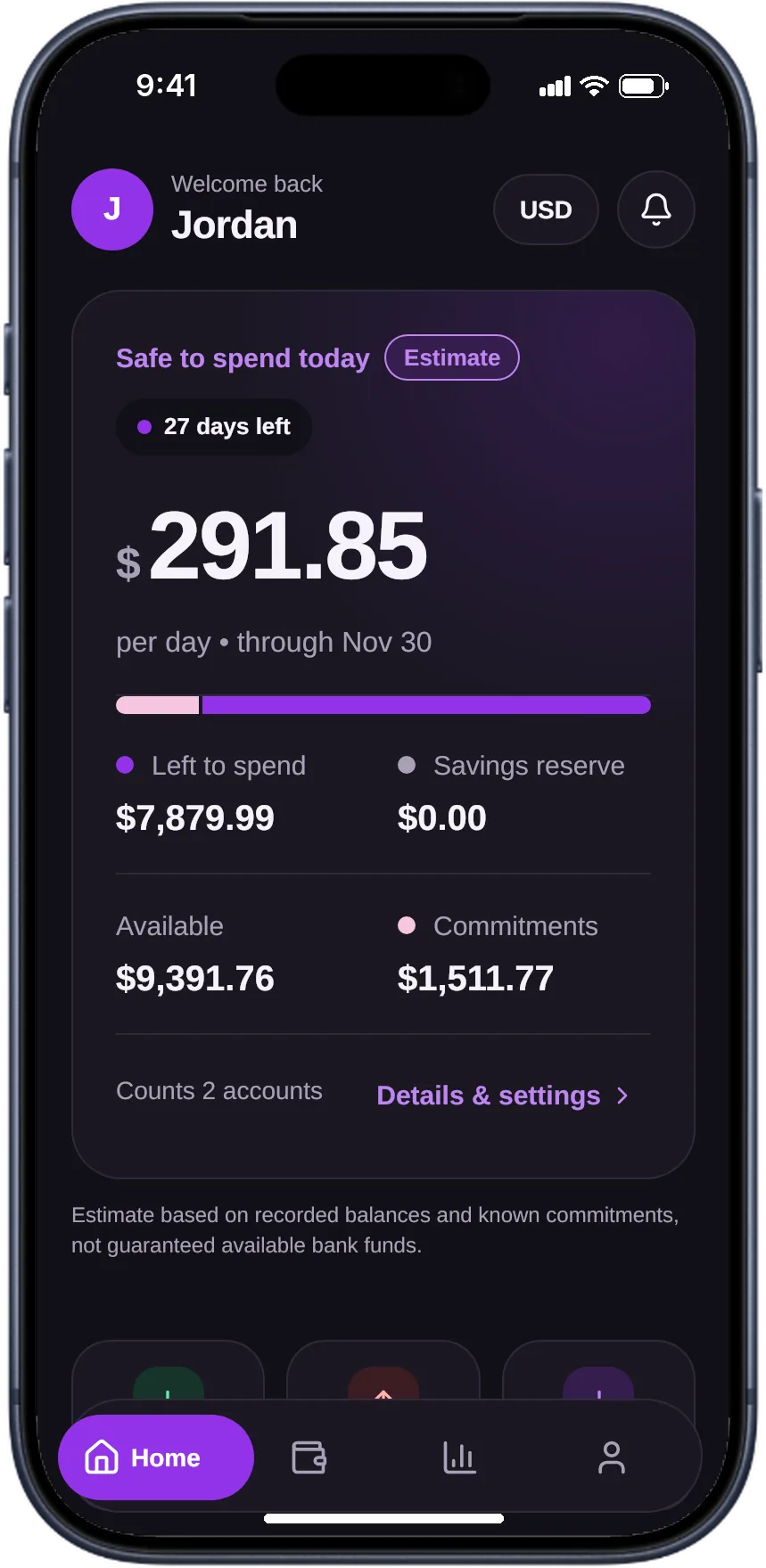
The Safe to spend screen with fictional data: the daily estimate and its breakdown into available money, commitments and savings reserve.
Real Spndy screens, filled with fictional sample data.

How Spndy treats your numbers

  • You keep the records

    Spndy does not connect to your bank. You add accounts and transactions yourself, or import a CSV file on Premium and Family.

  • Currencies stay as entered

    Each account keeps its own currency. Spndy does not convert amounts, and totals across currencies are labelled as unconverted.

  • Estimates are labelled

    Safe to spend is an estimate from your own records. It is not your bank's available balance, and the app says so.

Features

The everyday money tools, in one place

Every tool works from the records you keep, and each one is marked with the plans that include it.

All plans

Safe to spend today

Spndy takes the balances of the accounts you count, sets aside your known commitments and a savings reserve you choose, and spreads the rest across the days left in your planning period.

  • Choose the currency, the accounts that count, your savings reserve and a plan-through date.
  • Open the breakdown to see the figures behind the number.
  • If something needs setup or review, Spndy says so instead of showing an unreliable figure.

An estimate from your recorded balances and commitments, not your bank's available funds.
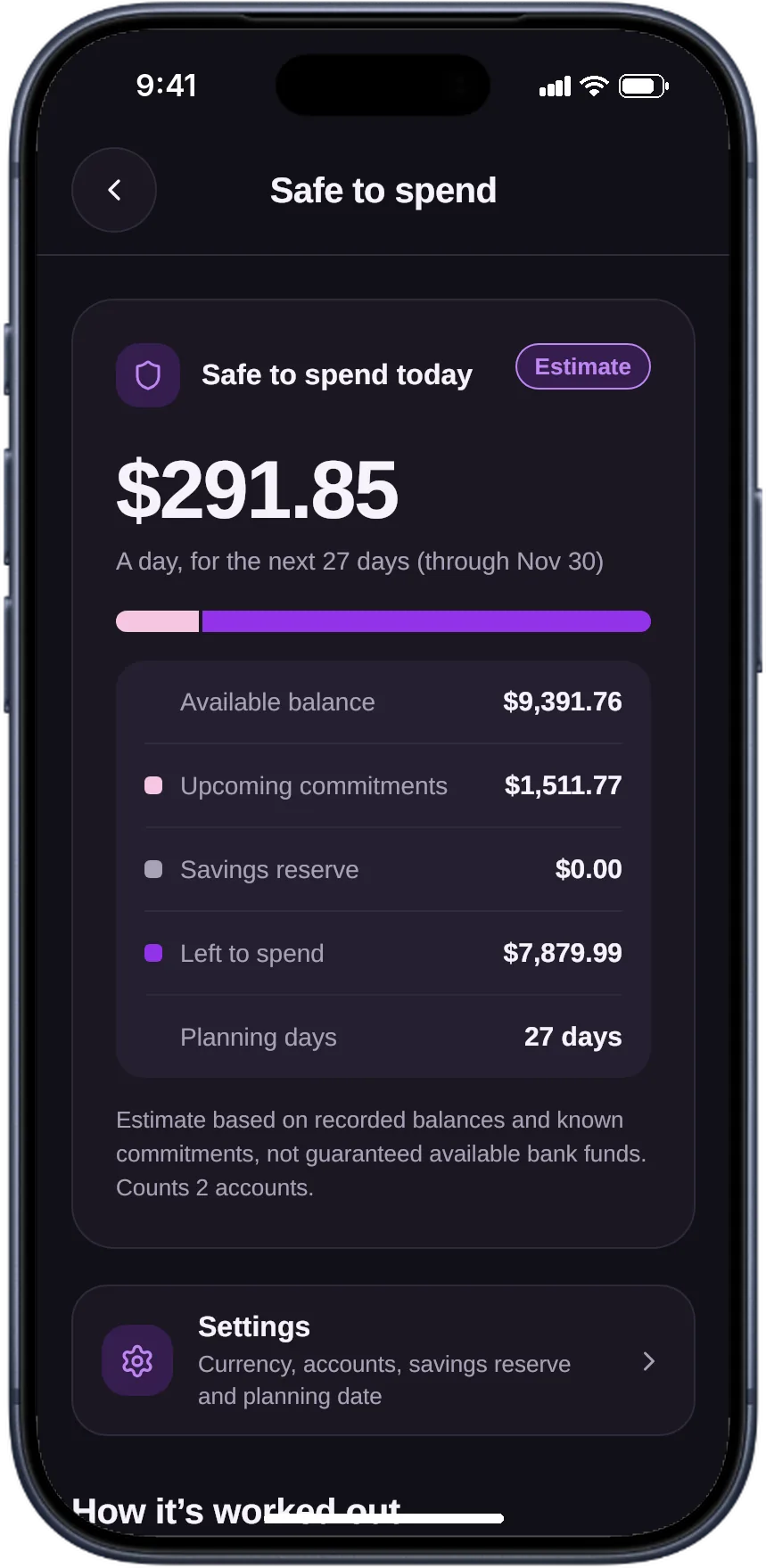
The Safe to spend screen in Spndy with fictional data: the daily estimate, the days left, and the breakdown into available money, commitments and savings reserve.
All plans

Income and expenses in seconds

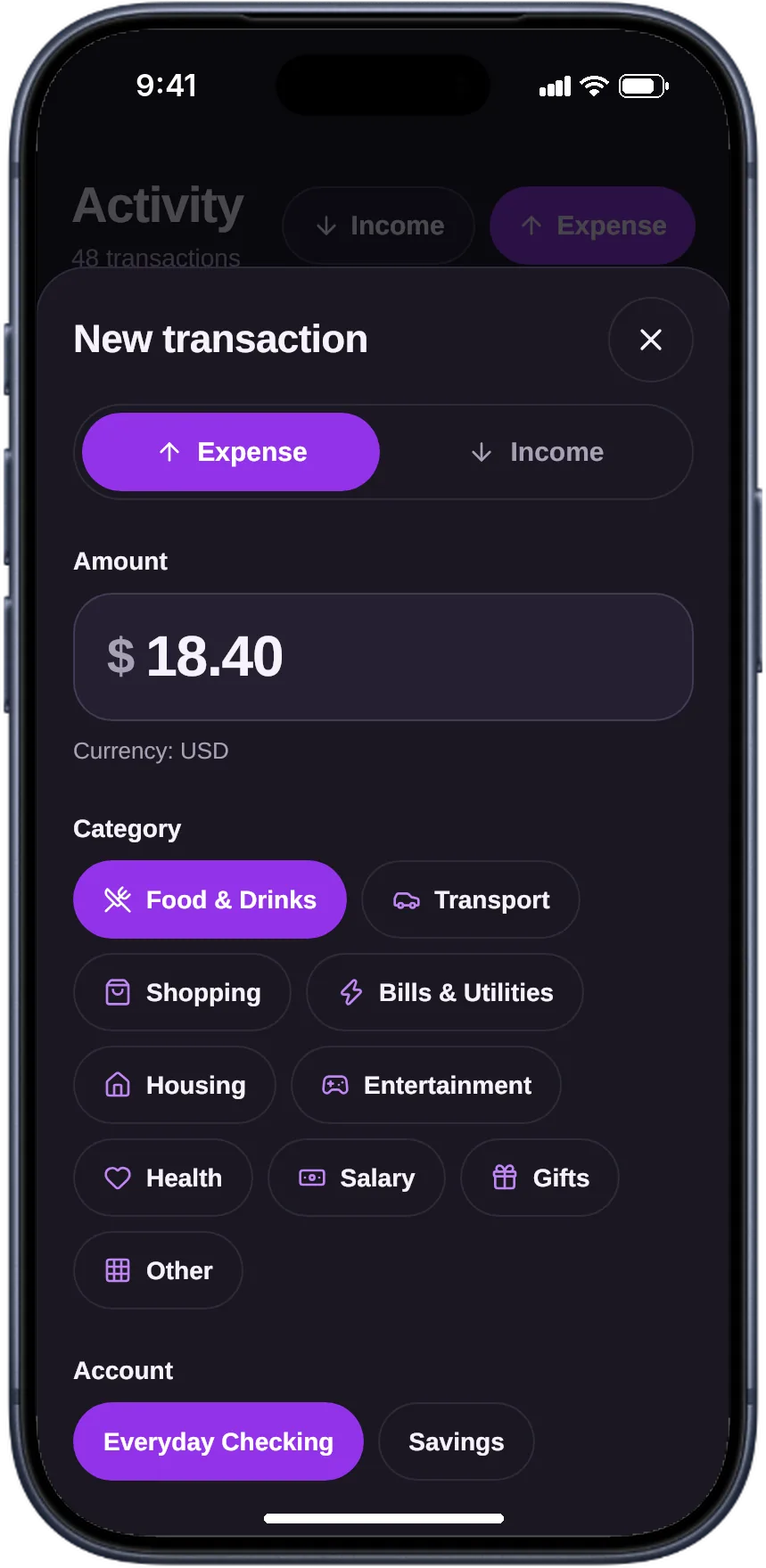
Tap Income or Expense and a short form opens with the type already chosen. Enter the amount, pick a category and the account, add a note if you like, and save.

  • Search Activity and filter it by income or expense.
  • Open any transaction to edit or delete it, and the account balance follows.
  • Amounts use the account's own currency.
The new expense form in Spndy, opened from Activity, with a fictional amount and note typed in and the category and account choices below.
All plans

A monthly budget for each category

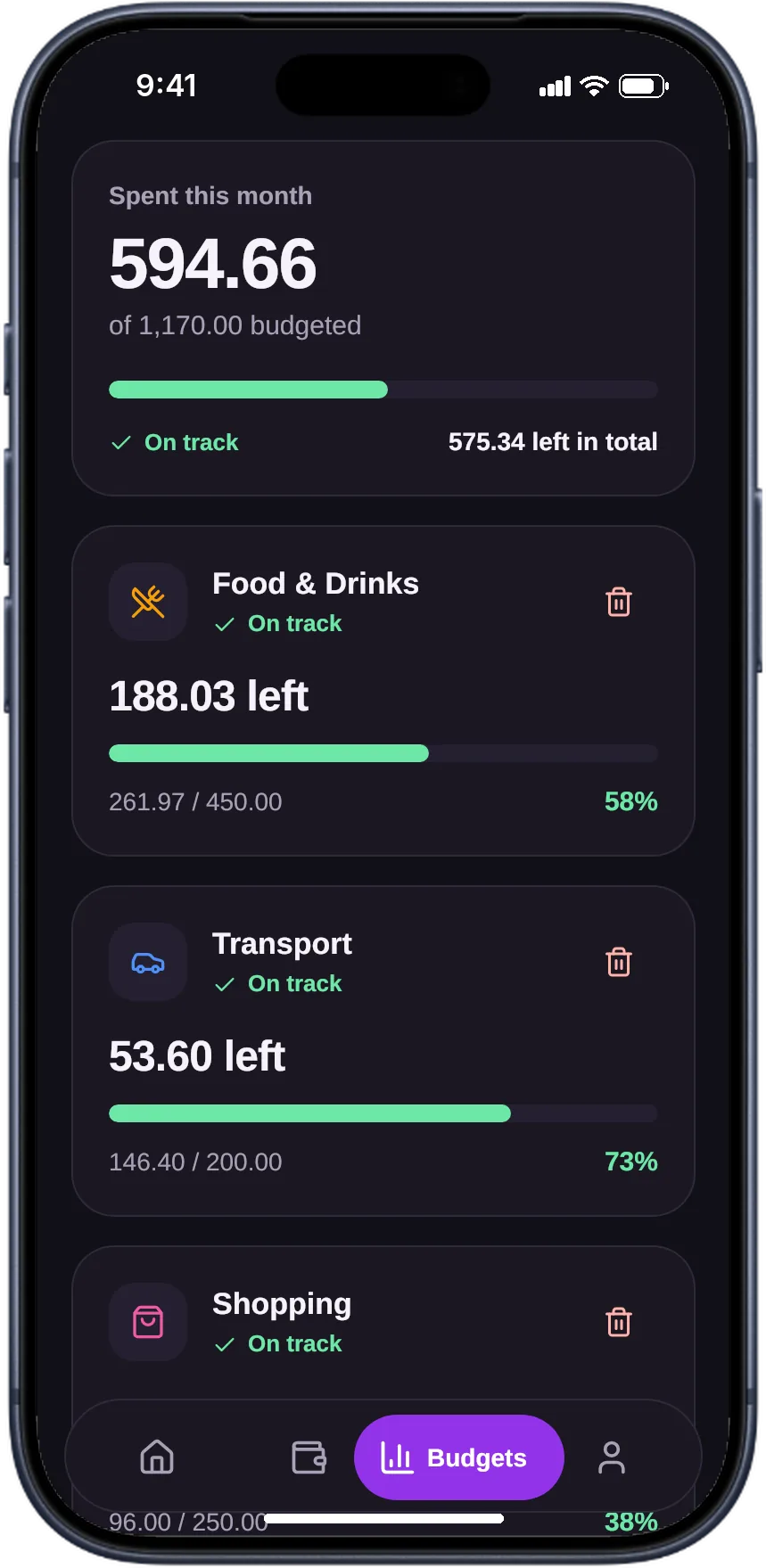
Give a category a monthly limit and Spndy shows how much is left as you record spending, with a total for the month across your budgets.

  • Progress for every category at a glance.
  • A clear note when a category needs attention.
  • A budget shows where you stand. It does not block a purchase or move money.
The Budgets screen in Spndy with a monthly total and fictional category budgets, each showing how much is left and a progress bar.
Premium and Family

Bills and subscriptions

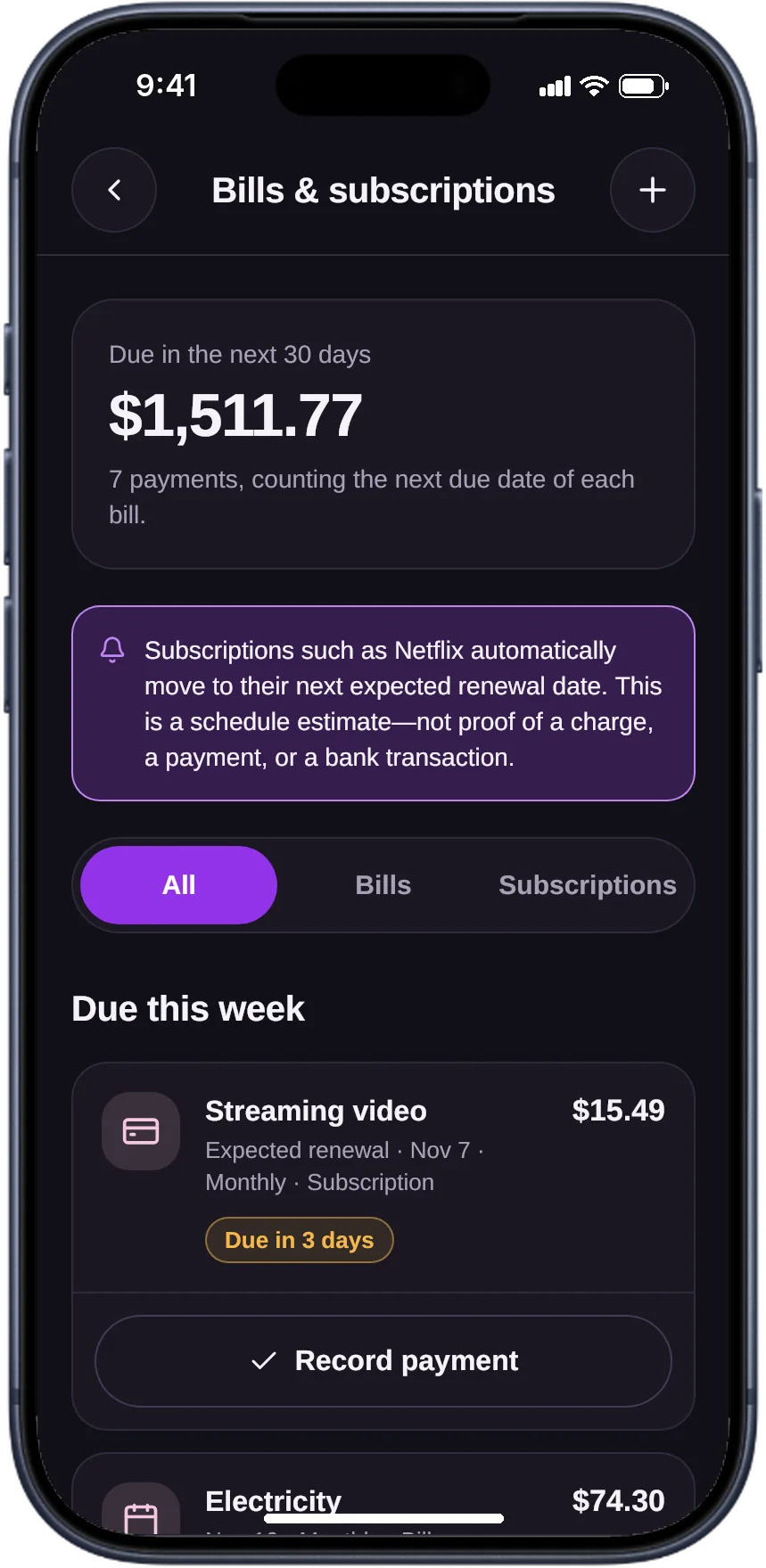
Track what is coming up, with the amount, currency, due date and repeat schedule. Upcoming bills count toward Safe to spend, so the daily number reflects them.

  • Mark a bill paid to record it in that bill's history.
  • Subscriptions show their next expected renewal date.
  • Spndy does not pay bills or move money for you.
The Bills and subscriptions screen in Spndy with the total due in the next 30 days and a list of fictional bills and subscriptions with their due dates.
Premium and Family

Reports that show where it went

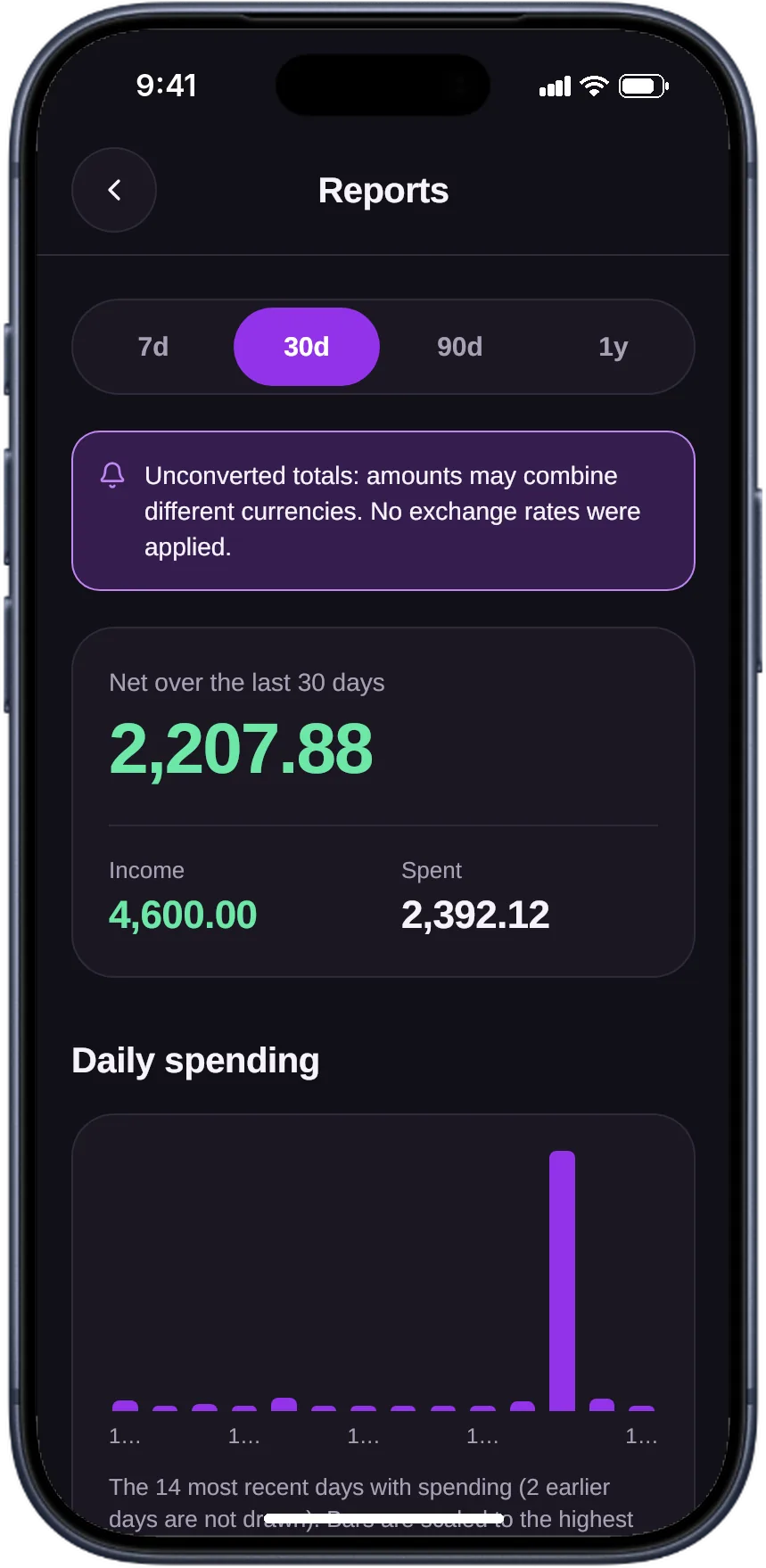
See income, spending and net for the last 7 days, 30 days, 90 days or year, with a chart of daily spending and a breakdown by category.

  • Switch the range with one tap.
  • Every figure comes from your recorded transactions.
The Reports screen in Spndy with fictional data: net, income and spending for the selected range, range buttons and a daily spending chart.
Safe to spend in Spndy, with fictional data.
The new expense form in Spndy, with fictional data.
Budgets in Spndy, with fictional data.
Bills and subscriptions in Spndy, with fictional data.
Reports in Spndy, with fictional data.

Also in Spndy

  • Accounts in their own currency

    Bank, savings, credit, cash and wallet accounts, each with its own currency and starting balance.

    All plans
  • Two-factor sign-in

    Protect your login with six-digit codes from an authenticator app, plus single-use recovery codes.

    All plans
  • Recurring transactions

    Make rent or a paycheque recurring and Spndy posts it daily, weekly, monthly or yearly.

    Premium and Family
  • CSV import

    Bring in past transactions from a CSV file. You see a preview, including any skipped rows, before anything is imported.

    Premium and Family
  • Notification inbox

    Messages from Spndy wait in an inbox inside the app, with an unread count on Home.

    All plans
  • Support inside the app

    Open a private support ticket from your profile and follow the replies in the same thread.

    All plans
  • Phone or computer

    Spndy runs in the browser at app.getspndy.com, with layouts made for small and large screens.

    All plans
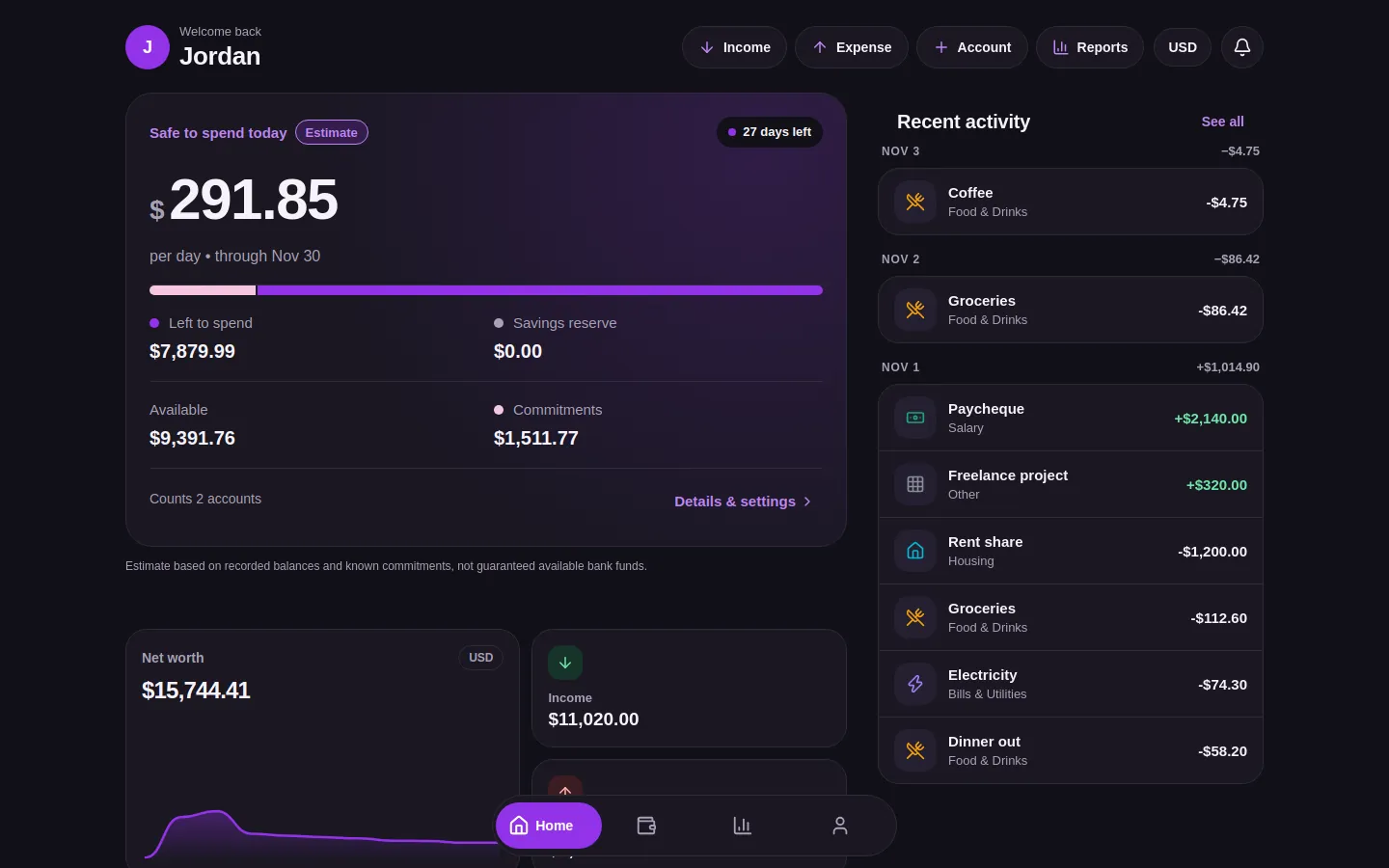
The Spndy Home screen on a computer with fictional data, with Safe to spend today and the rest of the dashboard laid out in columns.
The same app on a computer. On a phone, each screen fits a single column.

Spndy AI

Ask about your money. Get a plain answer.

Spndy AI explains what your own records show. It is optional, it stays off until you turn on AI analysis in the app, and it never edits your transactions, account balances or budgets.

Ask Spndy AI

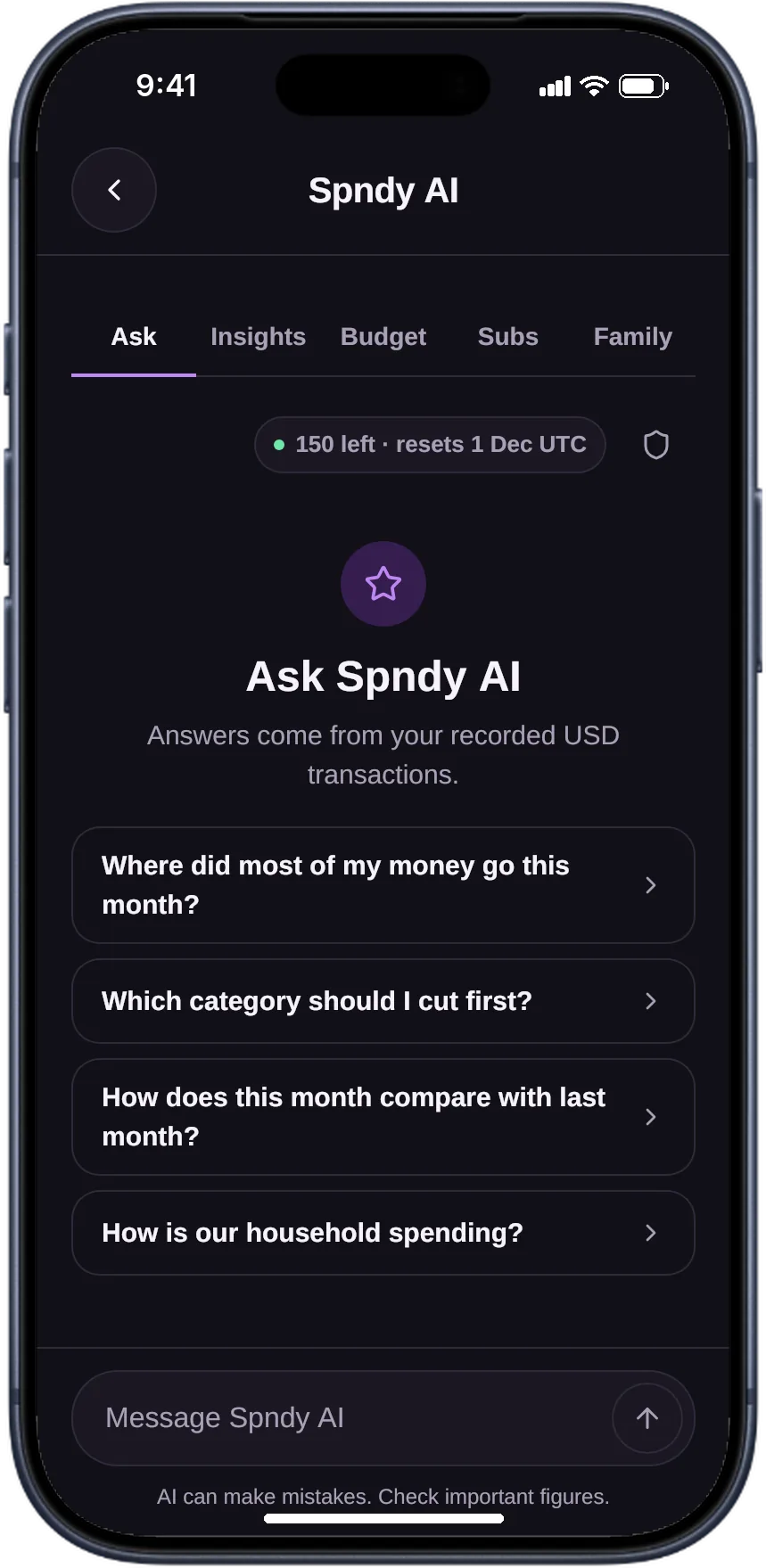
Type a question in plain words, or start from a suggestion. Spndy works out the figures from your records, and the AI explains them in a few sentences.

Suggested in the app

  • Where did most of my money go this month?
  • Which category should I cut first?
  • How does this month compare with last month?

Each answer uses one question from your monthly allowance.

The Ask tab of Spndy AI before a question is asked, with suggested questions and the message box, for a fictional customer.

Spending insights

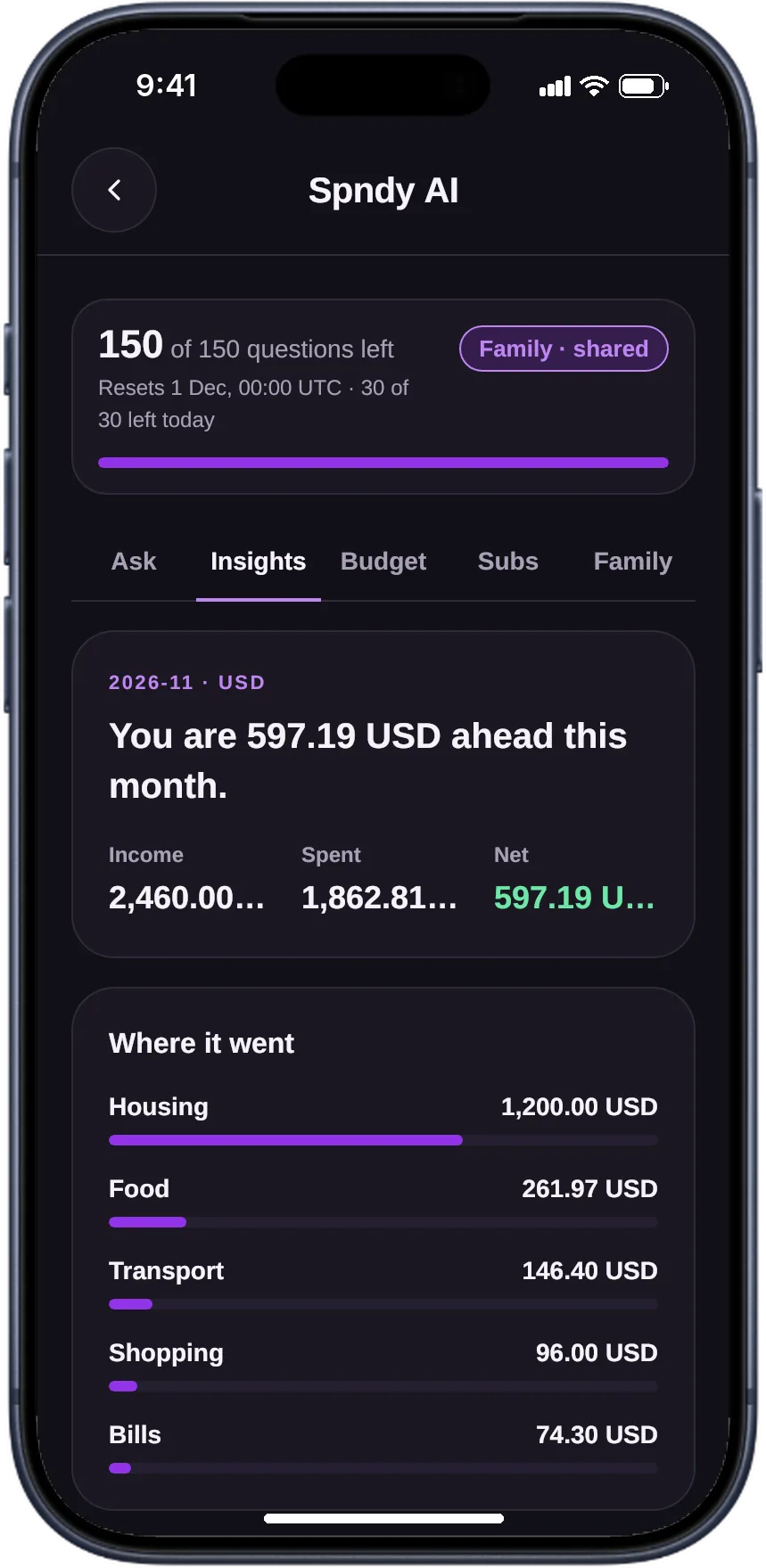
Income, spending and net for the month, with each category's spending and how it changed. Ask Spndy AI about any of it in one tap.

Calculated by Spndy, so it does not use a question.

Spending insights in Spndy AI with fictional data: income, spent and net for the month and where the money went, by category.

Budget coach

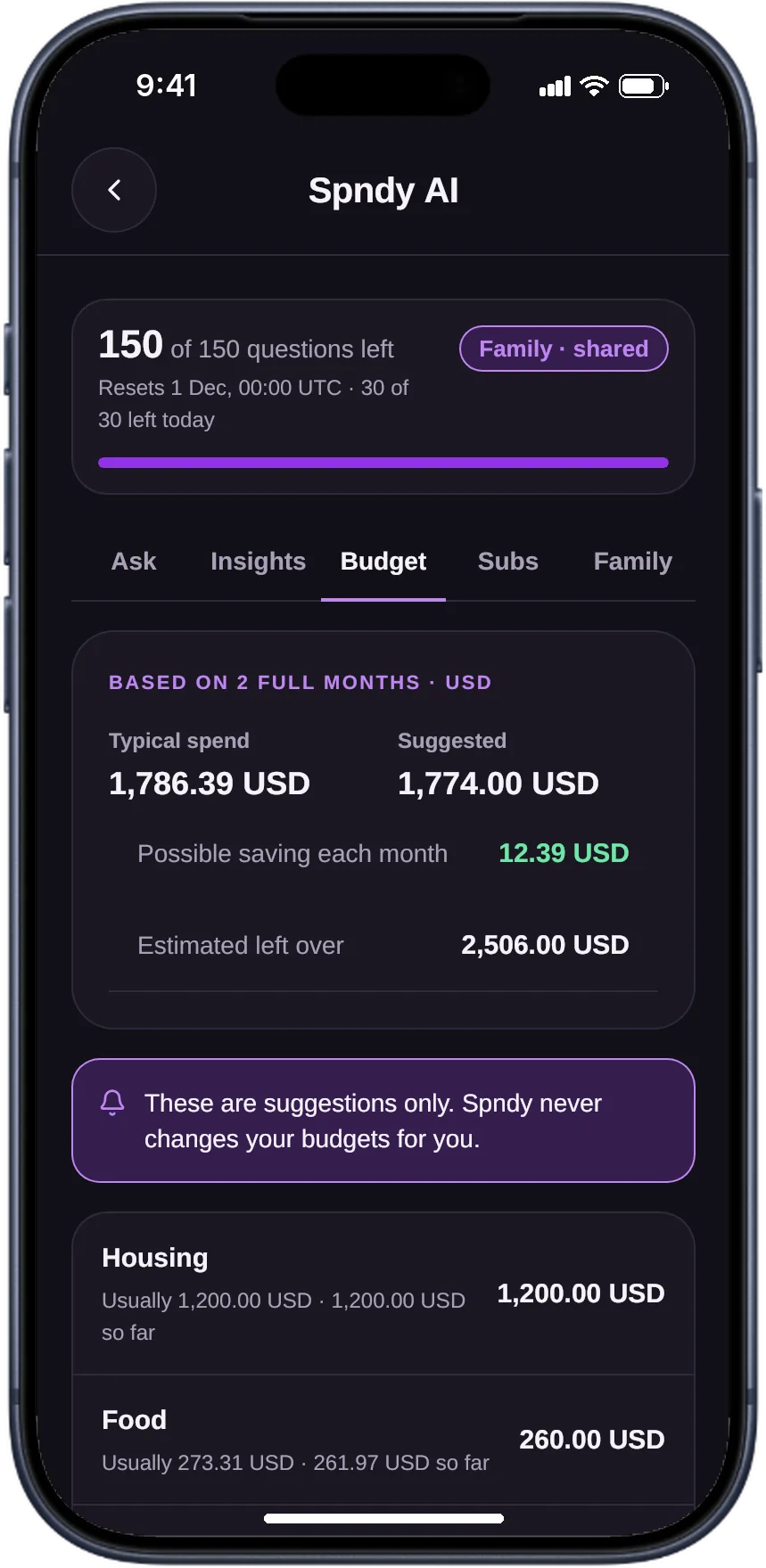
Suggested monthly budgets from your last three complete months, once at least two have recorded spending. Everyday essentials keep their average, food and flexible spending are trimmed a little, and each suggestion says why.

Suggestions never create or change a budget for you.

Calculated by Spndy, so it does not use a question.

Budget coach in Spndy AI with fictional data: typical and suggested monthly spending, the possible saving each month and a suggestion for each category.

Subscriptions

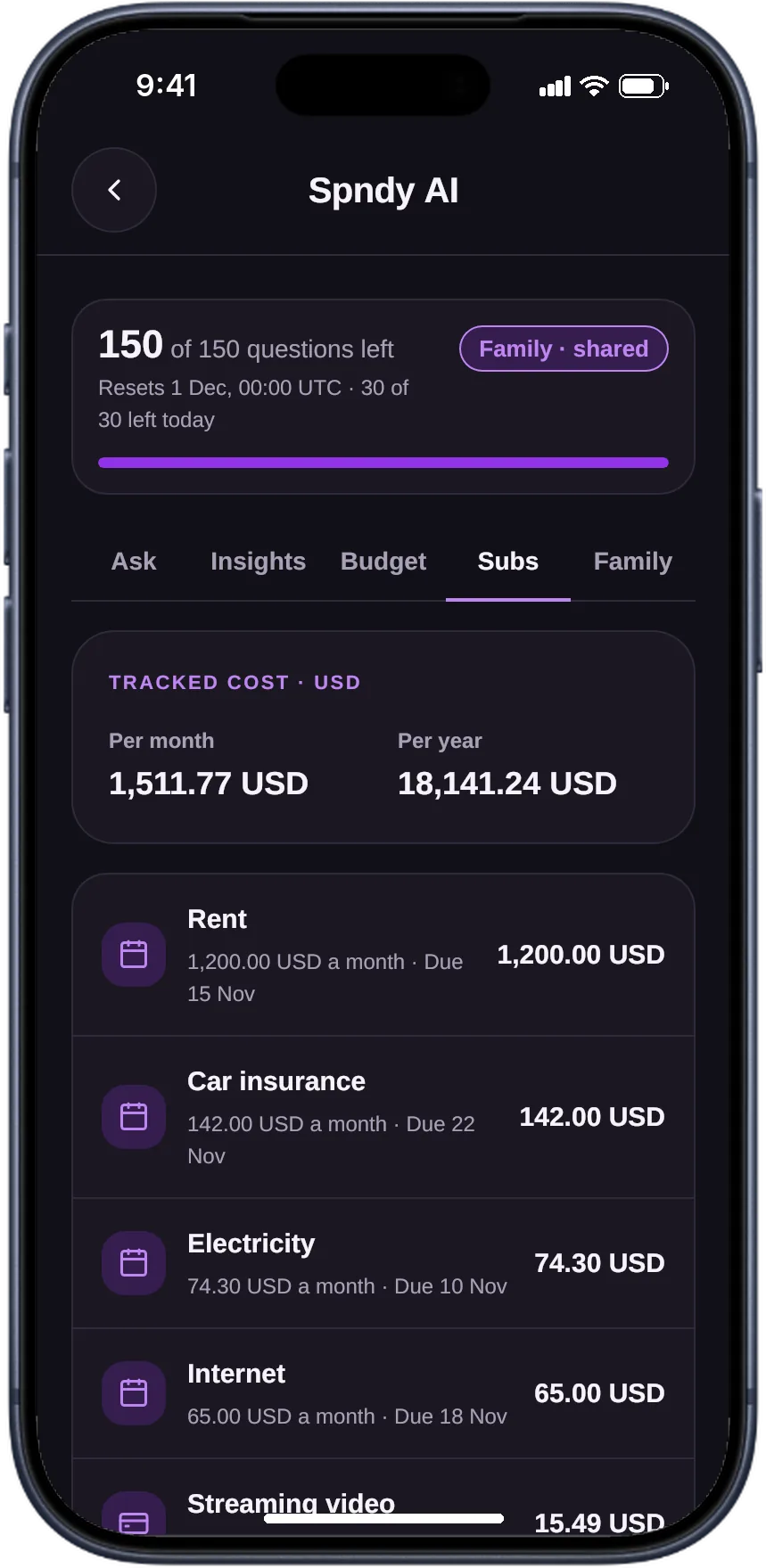
Monthly and yearly totals for the bills and subscriptions you track, each one listed, plus recurring charges in your transactions that are missing from Bills and subscriptions.

Spndy cannot see whether you still use a service, so flags are prompts to review, never an instruction to cancel.

Calculated by Spndy, so it does not use a question.

The Subscriptions tool in Spndy AI with fictional data: the tracked cost of bills and subscriptions per month and per year, with each one listed.

Category suggestions

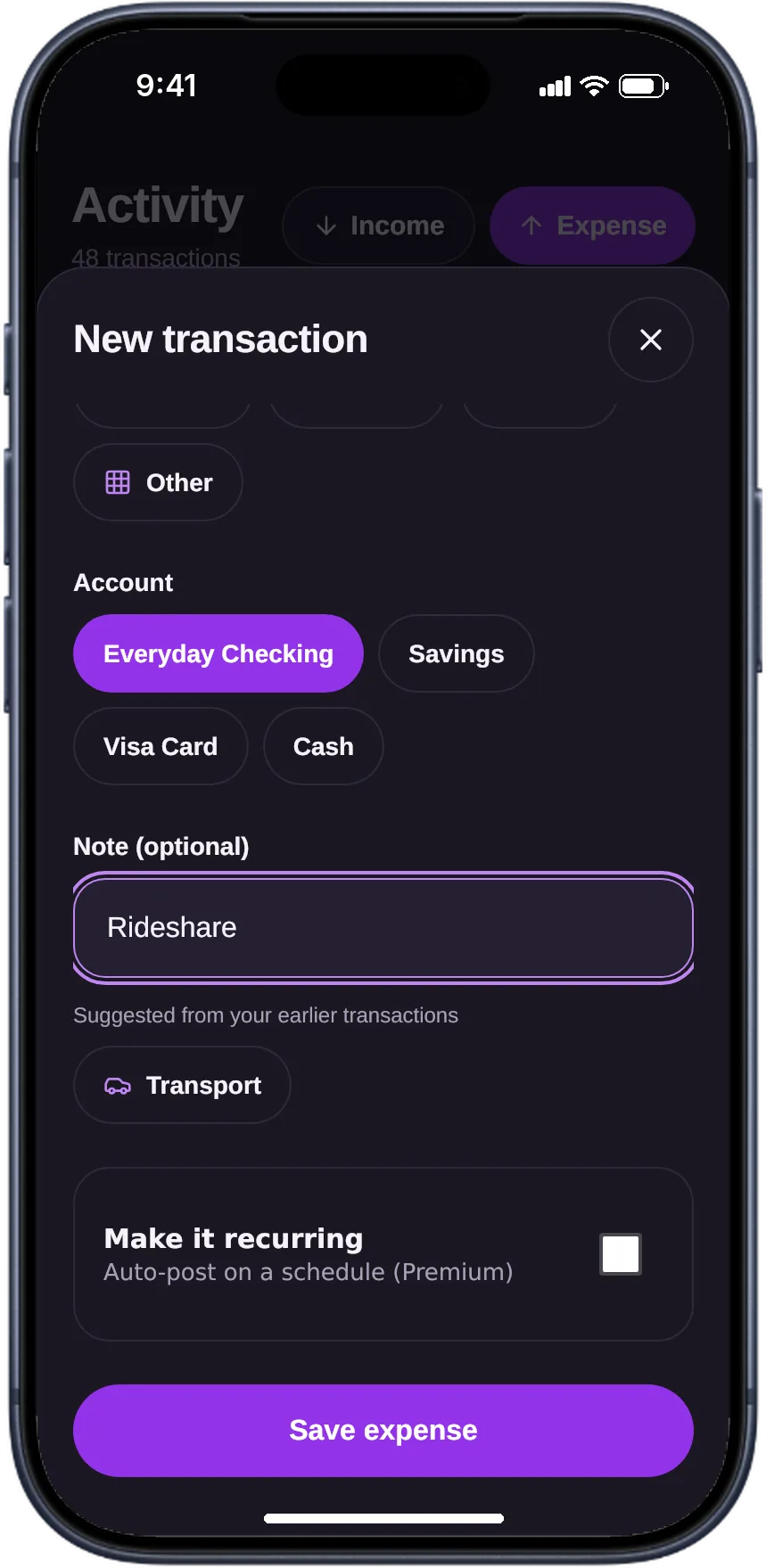
Type a note while you add a transaction and Spndy suggests categories from your own history. You still choose what to save.

Calculated by Spndy, so it does not use a question.

The new expense form with the fictional note Rideshare typed in and, below it, Spndy's suggestion from earlier transactions: Transport.

How an answer is made

  1. You ask

    A question in plain words, about one currency at a time.

  2. Spndy does the maths

    Totals and category amounts are calculated from your own records, inside Spndy.

  3. Claude explains

    Your question and a limited, single-currency summary go to Anthropic's Claude model, which writes the explanation.

  4. You decide

    The answer is information to check. Nothing in your records changes.

  • Opt-in

    Off until you turn on AI analysis. You can turn it off again whenever you like.

  • Read-only

    It never edits your transactions, account balances or budgets. It explains, and you decide.

  • Information, not advice

    Explanations can be wrong and are not financial, tax or legal advice.

Personal and household

For you, or for the people you live with

All plans

On your own

Your accounts, budgets and Safe to spend, in your own login and your own currency. Start here and add a household later if you want one.

Family

With a household

Create a household and give the people you live with its private eight-character code. Each person joins from their own Spndy login, so nobody is added without agreeing.

Everyone keeps their own accounts, and joining a household does not make anyone's personal transactions visible to the others.

How it works

Up and running in four steps

  1. Create your login

    Choose Get started and enter your name, email, country and currency. Follow the link in the verification email to choose a password, or continue with Google.

  2. Add a money account

    Give it a name, a type and a currency, and enter its starting balance. It is a record you keep, not a bank connection.

  3. Record what happens

    Add income and expenses as they happen. On Premium and Family you can also import a CSV file and make regular items recurring.

  4. Budget and check in

    Give a category a monthly budget, then glance at Safe to spend whenever you are about to spend.

Plans

Start free. Add more when you need it.

Every plan includes the core tracker. Paid plans add planning tools and room for more accounts, and you choose or change a plan inside the app.

Free

The core tracker.

  • Money accounts in their own currencies
  • Income and expense tracking
  • Monthly category budgets
  • Safe to spend today
  • Spndy AI, with a small monthly question allowance

Premium

Everything in Free, plus the planning tools.

  • Bills and subscriptions
  • Recurring transactions
  • Reports
  • CSV import
  • More accounts and a larger Spndy AI allowance

Family

Everything in Premium, for a household.

  • Create a household and invite people with a private code
  • The most accounts
  • A Spndy AI allowance shared by the household

The app shows current plans, prices and limits under Profile, Plans & pricing, and your own usage on the Subscription screen. When checkout is available, paid plans can be purchased there through Stripe.

Privacy and security

What Spndy does with your information

In plain words, as set out in our Privacy Policy.

  • No bank logins

    Spndy does not ask for online-banking credentials and does not move money between your accounts.

  • Account safeguards

    The website and the API use HTTPS. Passwords are stored as hashes, and repeated sign-in attempts are limited.

  • Two-factor authentication

    Add an authenticator app to your login, with single-use recovery codes in case you lose your phone.

  • Google sign-in, kept narrow

    Spndy asks Google only for the openid, email and profile permissions. It cannot read your Gmail, Drive files or contacts, and never sees your Google password.

  • Your data is not for sale

    We do not sell your personal information, use your financial records for advertising, or use them to train general-purpose AI models.

  • Payments stay with Stripe

    When checkout is available, payment is handled on Stripe's checkout page. Spndy does not receive or store your full card number.

No online service can guarantee absolute security. Read the full Privacy Policy and Terms of Service.

FAQ

Questions, answered

More step-by-step answers are in the Help centre.

Does Spndy connect to my bank?

No. A money account in Spndy is a record you keep, not a bank connection. You add transactions yourself, or import them from a CSV file on Premium and Family.

Do I need to install anything?

No. Spndy runs in your web browser at app.getspndy.com, on a phone or a computer.

Is there a free plan?

Yes. You can start on Free and upgrade inside the app when you want bills, reports, recurring transactions, CSV import or a household. The app shows the current plans and prices.

What is Safe to spend?

A daily estimate: the balances you have recorded in the accounts you count, minus your known commitments and the savings reserve you choose, spread over the days left in your planning period. It is not your bank's available balance.

Does Spndy convert currencies?

No. Each account keeps its own currency and amounts are not converted. Your preferred currency is a display preference, and totals across currencies are marked as unconverted.

Can I bring in my transaction history?

Yes, from a CSV file on Premium and Family. You choose the account, check a preview with any problem rows, and then import. The file needs date, amount and type columns; category and note are optional.

Do I have to use Spndy AI?

No. Spndy AI is optional and stays off until you turn on AI analysis in the app. You can turn it off again at any time, and everything else keeps working.

How do households work?

On the Family plan you can create a household and share its private code with the people you live with. Each person joins from their own login and keeps their own accounts, and joining does not share their personal transactions. Email invitations are not available yet; the code is how people join.

How do I get help or close my account?

Visit the Help centre, open Contact support in the app, or email [email protected]. To close your account, submit a deletion request from Profile, App settings. Support reviews it before anything is permanently deleted.

Step-by-step help, whenever you need it

The Spndy Help centre has guides for signing up, Safe to spend, budgets, bills, households, CSV import and Spndy AI, with search to find the right one.

Visit the Help centre

Know where every dollar goes.

Create your login and add your first account in a few minutes.